
FLEET HEALTH
Identify failing batteries before they cause an incident
Most drone incidents trace back to a battery problem that developed over time. AirData analyzes every cell in every battery after every flight, tracking voltage deviation, temperature, and degradation. When a cell begins to drift, you receive an alert early enough to replace a battery instead of losing an aircraft.
|
✔ Per-cell voltage deviation analysis and lifetime degradation trends |
FLIGHT DATA
Every flight logged automatically
Flight logs sync to AirData automatically from DJI, Autel, Skydio, Parrot, and more than 40 flight apps, with no manual work from your pilots. When you need to review a flight, you can replay the full telemetry: altitude, signal strength, wind, warnings, and aircraft behavior throughout the flight.
|
✔ Automatic upload from the apps your pilots already use |
Works with 180+ aircraft and apps from DJI, Autel, Skydio, Parrot, Freefly, and more. Check your aircraft · Check your flight app

COMPLIANCE
Generate audit-ready compliance reports in minutes
When your aviation authority, insurer, or leadership requests records, the documentation is already prepared. AirData generates standardized reports covering flight hours by pilot, maintenance history by aircraft, and regulatory compliance documentation from templates you configure once and run on a schedule.
|
✔ Report formats built for civil aviation authority requirements worldwide, including FAA COA |
OPERATIONS
Standardize operations across every pilot
Plan the mission, assign the pilot and aircraft, and attach the checklist, with airspace and weather built in. Every pilot follows the same pre-flight process, and mission data is captured automatically for reporting.
|
✔ Centralized mission planning with airspace and weather |

RISK MONITORING
Know about issues while there is still time to act
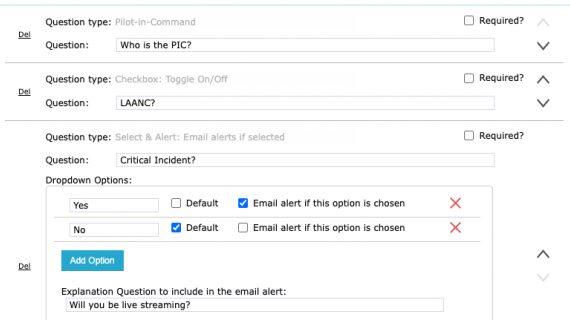
Set the thresholds that matter to your operation, including battery temperature, cell deviation, altitude limits, and maintenance intervals. AirData monitors them continuously across your fleet and notifies the right person the moment a condition goes out of bounds.
|
✔ Continuous monitoring of equipment, operations, and environmental conditions |
In Action
Sample Views of Airdata UAV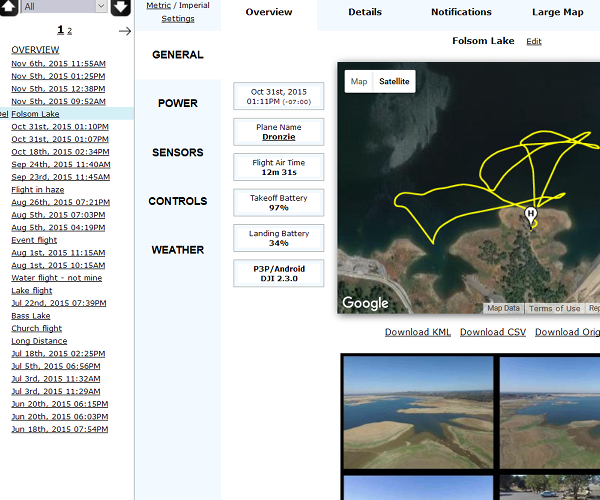
Flight Logbook Management
Capture and log relevant details of your flight for reporting and maintenance
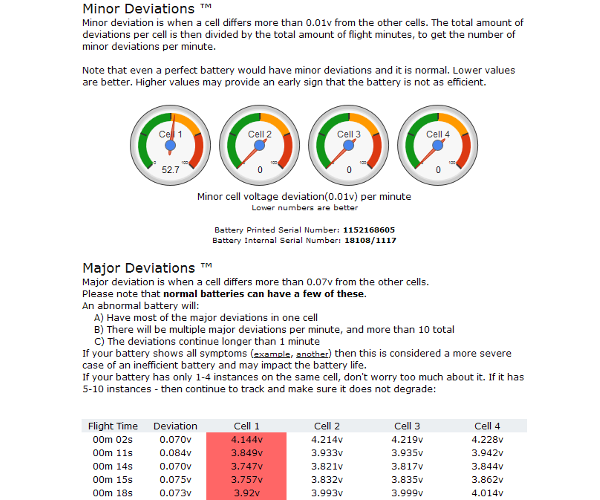
Battery Health Analysis
Identify issues in individual battery cells
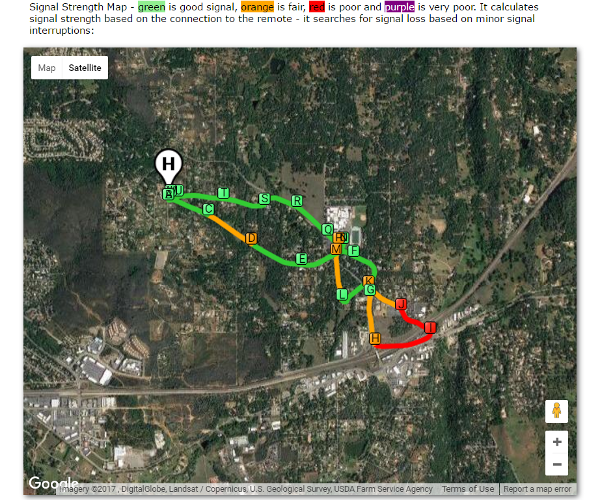
Sensor Maps
See signal strength connection between the control and the aircraft and identify areas of interference
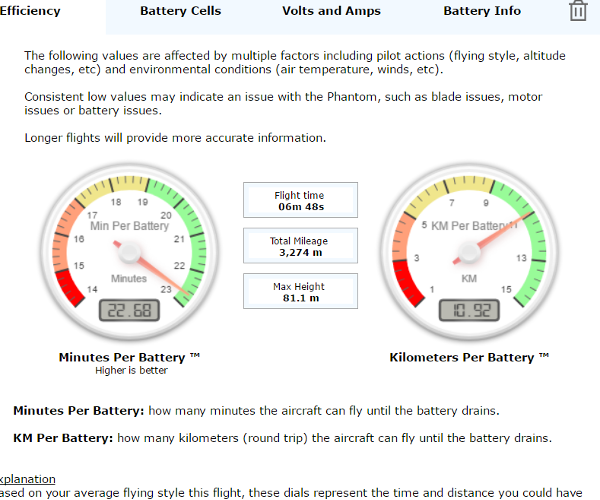
Battery Efficiency
Know your range in terms of mileage and in-flight minutes
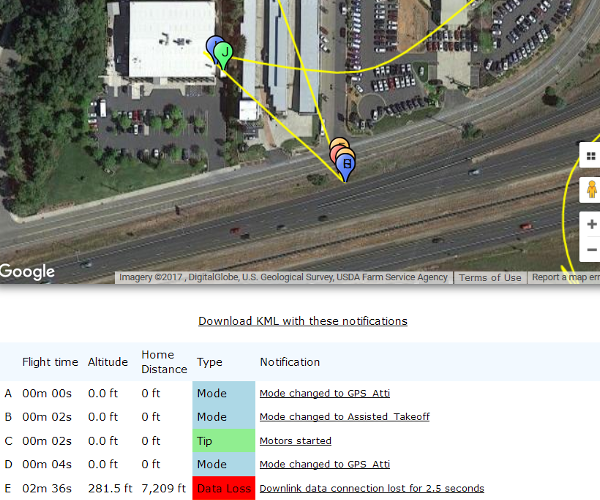
Alerts and Notifications
Get notifications on warnings, system errors or sudden changes in context of your flight
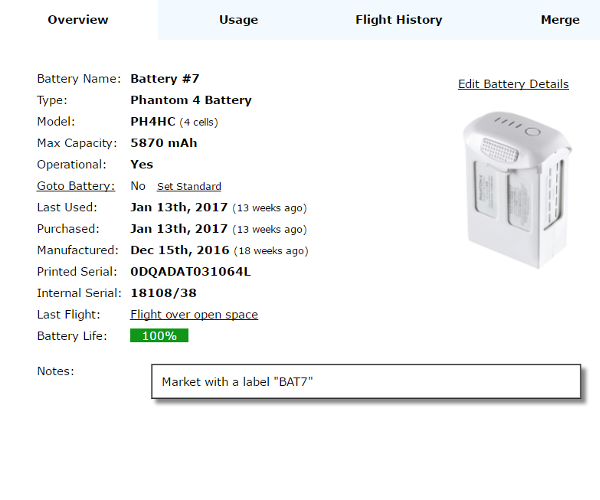
Asset Tracking
Track usage and maintenance services for drones and batteries
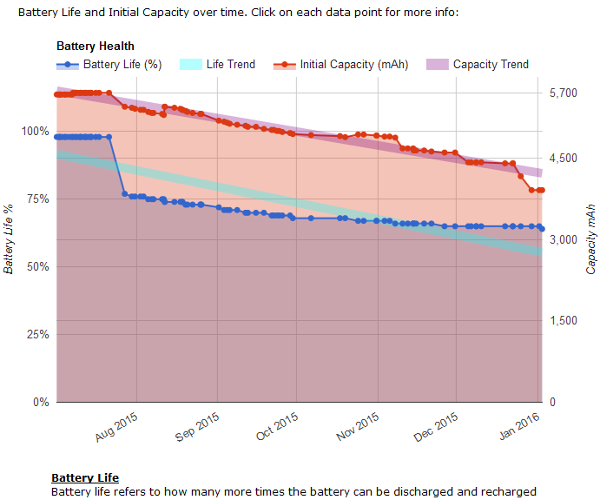
Battery Trends
Track and spot battery issues before they become a problem
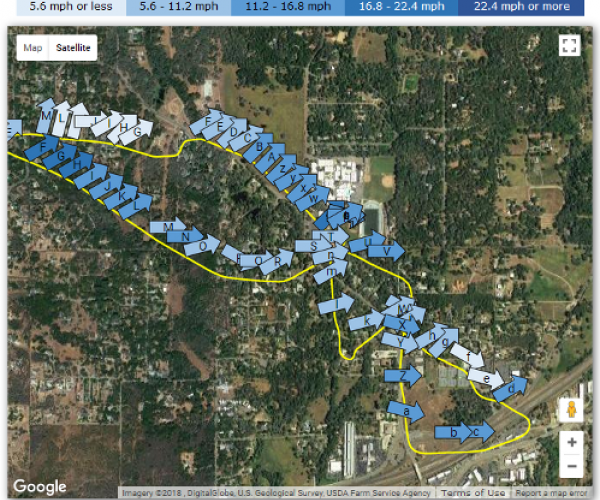
InFlight Wind
Understand the impact of wind on the aircraft throughout the flight
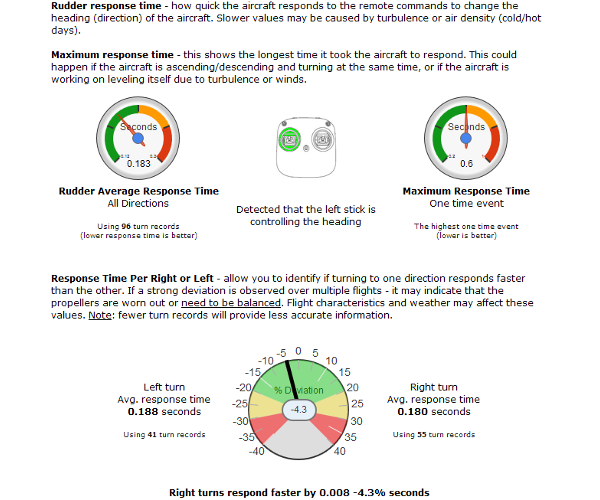
Control Response
Identify potential issues and ensure controls are fully operable
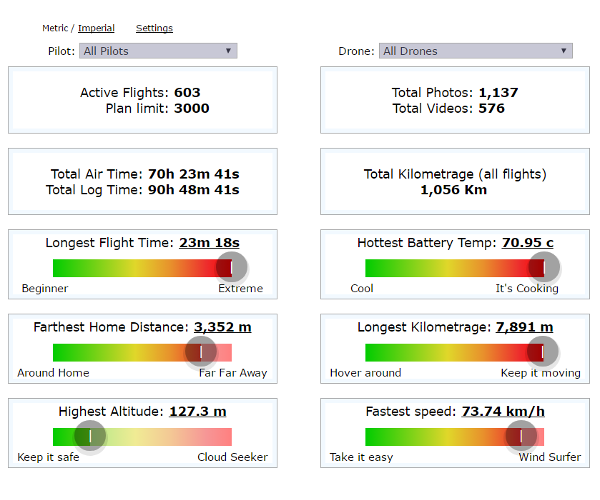
Flight Dashboard
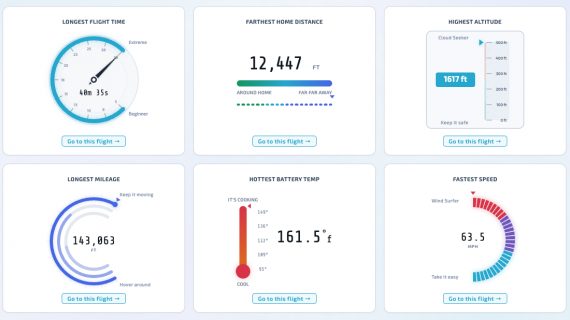
See key metrics and summary statistics for all your flights
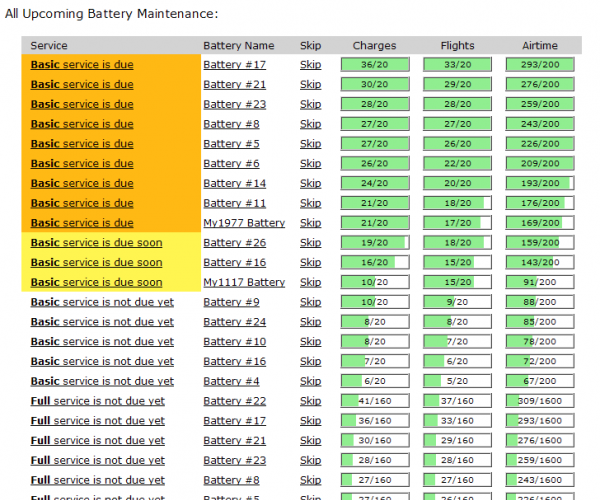
Maintenance Tracking
Automatically track upcoming and completed maintenance items
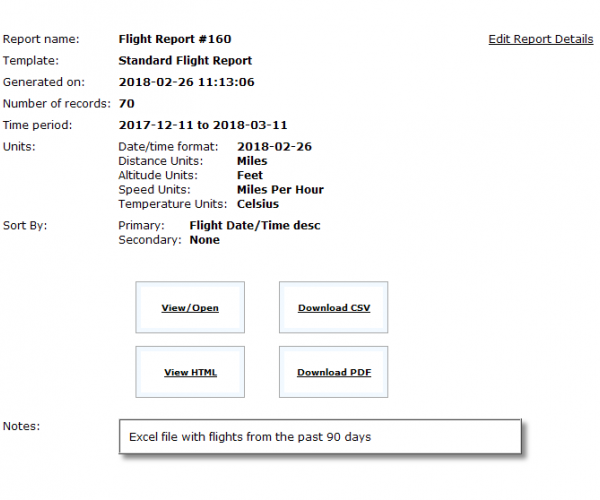
Advanced Reporting
Advanced yet simple to use reporting system. Meet government compliance requirements and internal reporting needs.
EVER EXPANDING LIST
Supported AircraftBrand |
Aircraft |
Model |
Supported |
Notes |
|---|---|---|---|---|
| ACSL | SOTEN |  |
.tlog flight logs are supported | |
| AEE | Mach | Mach 4 | |
No Smart Battery |
| Mach 6 | |
No Smart Battery | ||
| Anzu | Raptor | Raptor | |
Manual upload support for the JSON log files. Learn more |
| Raptor T | |
Manual upload support for the JSON log files. Learn more | ||
| Arace | Griffin | Griffin Pro | |
Support for the TLOG log files |
| Arcsky | Xplorer | Xplorer | |
Batch upload available with AirData mobile app. |
| Arcsky | X55 | X55 | |
Auto upload available with AirData mobile app. |
| ArduPilot | ArduPilot | Any ArduPilot aircraft | |
ArduPilot .bin and .tlog flight logs are supported |
| Ascent | Spirit | |
Support for the BIN and TLOG log files | |
| Autel | Alpha | Alpha | |
Auto upload is available |
| Autel | Dragonfish | Dragonfish | |
Auto upload is available |
| Autel | EVO | EVO | |
Auto upload is available |
| EVO 2 | |
V1, V2 and V3 are supported
Auto upload is available |
||
| EVO Lite 6K Enterprise | |
Auto upload is available | ||
| EVO Lite 640T Enterprise | |
Auto upload is available | ||
| EVO Max 4T | |
Auto upload is available | ||
| EVO Max 4N | |
Auto upload is available | ||
| Autel | Nano | Nano | |
|
| Nano+ | |
|||
| Autel | Lite | Lite | |
|
| Lite+ | |
|||
| BRINC | Lemur | Lemur 2 | |
Auto upload via the BRINC LiveOps |
| BRINC | Responder | Responder | |
Auto upload via the BRINC LiveOps |
| CHCNAV | X500 | X500 | |
|
| DJI | AGRAS | MG-1P | |
Sprayer rate is available
Enterprise plan is required |
| MG-1S | |
Sprayer rate is available
Enterprise plan is required |
||
| T16 | |
Sprayer rate is available
Enterprise plan is required |
||
| AGRAS T10 T-10 | |
|||
| AGRAS T20 T-20 | |
|||
| AGRAS T20P T-20P | |
|||
| AGRAS T25 T-25 | |
|||
| AGRAS T30 T-30 | |
|||
| AGRAS T40 T-40 | |
|||
| AGRAS T50 T-50 | |
|||
| AGRAS T70 T-70 | |
|||
| AGRAS T100 T-100 | |
|||
| DJI | Air | Air 2 | |
|
| Air 2S | |
|||
| Air 3 | |
|||
| Air 3S | |
|||
| DJI | Avata | Avata | |
|
| Avata 2 | |
|||
| Avata 360 | |
|||
| DJI | Flip | Flip | |
|
| DJI | FlyCart | FlyCart 30 | |
|
| DJI | FPV | FPV | |
|
| DJI | Phantom 3 | Standard | |
Short Battery Serial |
| 4K | |
Short Battery Serial | ||
| Advanced | |
Short Battery Serial | ||
| Professional | |
Short Battery Serial | ||
| SE | |
|||
| DJI | Phantom 4 | Original | |
Short Battery Serial |
| Advanced | |
|||
| Advanced+ | |
How to install Airdata app | ||
| Multispectral | |
|||
| Pro | |
|||
| Pro+ | |
How to install Airdata app | ||
| Pro V2 | |
|||
| RTK | |
How to install Airdata app | ||
| DJI | Inspire 1 | All models | |
Short Battery Serial |
| DJI | Inspire 2 | Inspire 2 | |
Limited bat serial on older iOS |
| DJI | Inspire 3 | Inspire 3 | |
|
| DJI | Lito | Lito | |
|
| Lito X1 | |
|||
| DJI | Mavic | Air | |
|
| Air 2 | |
|||
| Air 2S | |
|||
| Pro | |
Limited bat serial on older iOS | ||
| Platinum | |
Will show as 'Mavic Pro' | ||
| DJI | Mavic 2 | Enterprise | |
|
| Enterprise Advanced | |
|||
| Enterprise Dual | |
|||
| Pro | |
|||
| Zoom | |
|||
| DJI | Mavic 3 | Mavic 3 | |
|
| Mavic 3 Cine | |
|||
| Mavic 3 Classic | |
|||
| Mavic 3 Enterprise | |
|||
| Mavic 3 MultiSpectral | |
|||
| Mavic 3 Pro | |
|||
| Mavic 3 Thermal | |
|||
| DJI | Mavic 4 | Mavic 4 Pro | |
|
| DJI | Matrice | 3D | |
|
| 3TD | |
|||
| 4E | |
|||
| 4T | |
|||
| 4D Dock 3 | |
How To | ||
| 4TD Dock 3 | |
How To | ||
| M100 | |
Short Battery Serial | ||
| M200 | |
|||
| M210 / RTK | |
|||
| Matrice 30 / M30 | |
|||
| Matrice 300 / M300 RTK | |
|||
| Matrice 350 / M350 RTK | |
|||
| Matrice 400 / M400 | |
|||
| Matrice 600 / M600 | |
Limited Battery Info
Short Battery Serial |
||
| Matrice 600 Pro | |
Limited Battery Info | ||
| DJI | Mini | Mini | |
|
| Mini SE | |
|||
| Mini 2 | |
|||
| Mini 2 SE | |
|||
| Mini 3 | |
|||
| Mini 3 Pro | |
|||
| Mini 4 Pro | |
|||
| Mini 4K | |
|||
| Mini 5 Pro | |
|||
| DJI | Neo | Neo | |
|
| Neo 2 | |
|||
| DJI | Spark | |
Limited bat serial on older iOS | |
| Event 38 | E400 | E400 | |
ArduPilot .tlog flight logs are supported |
| Event 38 | E455 | E455 | |
ArduPilot .tlog flight logs are supported |
| FlightWave | Edge | Edge 130 Enterprise | |
Upload .ulg log file |
| Flyability | Elios | Elios | |
Manually upload .LOG or .EFLY files |
| Elios 2 | |
Manually upload .LOG or .EFLY files | ||
| Elios 3 | |
Manually upload .LOG or .EFLY files | ||
| Flybotix | ASIO | ASIO PRO | |
Upload .ulg log file |
| ASIO X | |
Upload .ulg log file | ||
| Freefly | Alta | Alta 6 | |
No Smart Battery |
| Alta 8 | |
No Smart Battery | ||
| Alta X | |
Upload .ulg log file | ||
| Alta X Gen 2 | |
Upload .ulg log file | ||
| Alta X Gen 2 Blue | |
Upload .ulg log file | ||
| Freefly | Astro | Astro | |
Auto upload is available |
| Astro Max | |
Batch upload is available | ||
| Astro Blue | |
Auto upload is available | ||
| Astro Max Blue | |
Batch upload is available | ||
| Freespace Operations | Callisto 50 | Callisto 50 | |
Support for the BIN log files |
| Harris | Carrier | H6 | |
Support for the TLOG log files |
| HX8 | |
Support for the BIN log files | ||
| Hylio | AG | AG-210 | |
Support for BIN log files |
| AG-216 | |
Support for BIN log files | ||
| AG-230 | |
Support for BIN log files | ||
| AG-272 | |
Support for BIN log files | ||
| Hylio | Ares | Ares | |
Support for BIN log files |
| Inspired Flight | IF1200 | IF1200 | |
ArduPilot .bin flight logs are supported |
| Microdrones | md4 | md4-200 | |
|
| md4-1000 | |
|||
| md4-3000 | |
|||
| Parrot | Anafi | Anafi | |
Auto sync is supported from the FreeFlight 6 app |
| Anafi Ai | |
|||
| Anafi Thermal | |
Auto sync is supported from the FreeFlight 6 app | ||
| Anafi USA | |
Auto sync is supported from the FreeFlight 6 app | ||
| Anafi USA Gov | |
Auto sync is supported from the FreeFlight 6 app | ||
| Anafi UKR | |
Support for the JSON log files | ||
| Parrot | Bepop 2 | |
Auto sync is supported in Account->Parrot No Smart Battery |
|
| Parrot | Disco | |
Manual upload support for the PUD log files. No Smart Battery |
|
| Percepto | Percepto | |
Support for the BIN log files | |
| PX4 | PX4 Autopilot | Any PX4 aircraft | |
PX4 .ulg flight logs are supported |
| Quantum Systems | Trinity | Trinity F90+ | |
Support for the BIN log files. For example: FLY_2022.BIN |
| Trinity Pro | |
Support for the PLD log files. For example: log_0006.PLD | ||
| Red Cat | Teal | Golden Eagle | |
.ulg flight logs are supported |
| Teal 2 | |
.ulg flight logs are supported | ||
| senseFly | eBee | eBee X | |
Support for the JSON log files |
| Sentera | PHX | PHX Fixed-Wing | |
Support for the CSV log files |
| Skydio | Skydio 2 | |
Auto sync is supported, learn more | |
| Skydio | Skydio 2+ | |
Auto sync is supported, learn more | |
| Skydio | Skydio Dock | Skydio Dock | |
Auto sync is supported, learn more |
| Skydio Dock Lite | |
Auto sync is supported, learn more | ||
| Skydio | Skydio R10 | |
Auto sync is supported, learn more | |
| Skydio | Skydio X2 | |
Auto sync is supported, learn more | |
| Skydio | Skydio X10 | |
Auto sync is supported, learn more | |
| Sony | Airpeak | Airpeak S1 | |
.ulg flight logs are supported |
| Teledyne FLIR | FLIR SIRAS | SIRAS | |
Support for the JSON log files |
| Teledyne FLIR | FLIR SkyRanger R70 | SkyRanger R70 | |
Support for the JSON log files |
| Teltech | XTD-120 | XTD-120 | |
Support for the TLOG log files |
| Vantage Robotics | Vesper | |
||
| Voliro | Voliro | Voliro T | |
.ulg flight logs are supported |
| Watts Innovations | Prism | Prism Lite | |
Support for the BIN log files |
| Wingcopter | Wingcopter | |
No Smart Battery | |
| Wingtra | WingtraOne | WingtraOne | |
|
| WingtraOne GEN II | |
|||
| Wingtra | WingtraRay | WingtraRay | |
|
| Wispr | Ranger Pro | Ranger Pro | |
Support for the TLOG log files |
| Ranger Pro+ | |
Support for the TLOG log files | ||
| Wispr | SkyScout | SkyScout | |
Support for the TLOG log files |
| SkyScout 2 | |
Support for the TLOG log files | ||
| SkyScout 2+ | |
Support for the TLOG log files | ||
| SkyScout Pro | |
Support for the TLOG log files | ||
| XAG | P100 | P100 Pro | |
Support for CSV log files. No Smart Battery |
| Yuneec | H520 | |
Upload guide No Smart Battery |
Detailed notes |
| Older versions of 3rd party apps may report a shorter, encoded battery serial number, which will automatically create a new battery. Workaround: Batteries can be merged to address this. |
|
| As of DJI GO 3.1.11, Battery information in the log is limited. So temperature, cell deviations and amperage use are currently not available. |
|
| Older versions of DJI GO on iOS (4.1.3 and older) did not report the battery serial number properly for this aircraft (only about 1% of the iOS flights did).
Android is not affected by this (all versions) and reports the serial number properly. DJI GO iOS 4.1.4 or later reports the serial number correctly as well. Workaround: (for older iOS DJI GO versions) The ability to add batteries manually is available. You can access it via the "Add Battery" link, at the bottom-left of the Batteries page. Once you add the battery, you can then go to the Flight->General->Details screen and choose the correct battery for the flight. |
|
| While this aircraft uses more than one battery, only one battery is reported in the flight log. |
|
| The Phantom 4 Pro+ built in screen does not allow the installation of the HD Sync app. Solution: Use our DJI Direct Sync to automatically sync your flights with Airdata:
|
|
| This aircraft does not have a smart battery, therefore, no battery serial number is reported, and detailed battery information is not available (such as temperature, per-cell voltage, percent used, etc.) |
YOUR CHOICE
Supported Apps

Detailed notes |
| If changing batteries between flights, some app versions may require shutting down the app and restarting it to obtain the correct battery serial number |