AirData launches cloud recording and 10-minute rewind for drone live streaming
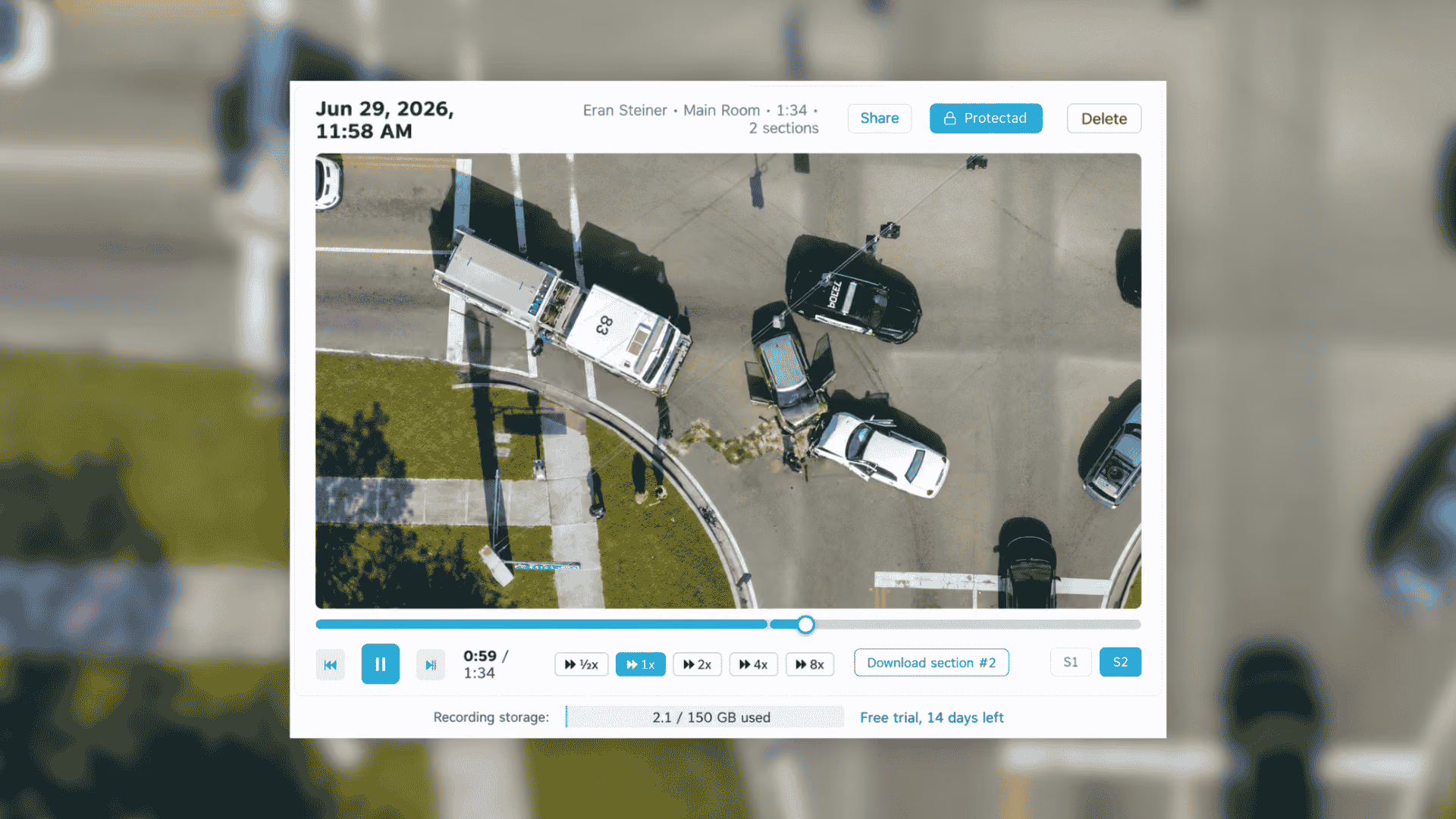

AirData has launched Stream Recording and Rewind for AirData Live Streaming, giving drone programs more control over live video during an operation and after the flight.
The update includes three new capabilities:
- 10-minute Rewind: Jump back through up to the previous 10 minutes while the stream remains live.
- Stream Recording: Save live streams to your AirData account for playback and review later.
- Capture what happened before recording started: Start a recording after an event occurs and include up to the previous 10 minutes.
Together, these features help teams recover moments they missed, save live video for later review and preserve a copy of the stream independently of the aircraft.
As drone programs expand into Drone as First Responder (DFR), dock-based inspections and beyond visual line of sight (BVLOS) operations, the pilot, aircraft and person making decisions may all be in different places. The person who needs to see the video may not be watching at the exact moment something important happens.
In a live operation, the most important moment does not wait for the right person to start recording. Especially on longer ops, the operator is not recording the whole time, so a key moment can go uncaptured. That's the problem we built this to solve. Teams can look back while the mission is still unfolding, preserve a second copy off the aircraft, and do it across any drone brand, dock, or flight app they already use.
- Eran Steiner, Founder and CEO, AirData
Go back without leaving the live stream
With 10-minute Rewind, authorized viewers can move back through an active stream, review what the drone already saw and then return to live.
For a public safety program, that could mean an analyst or commander joining after the drone has already reached the scene. Instead of relying on someone else to recap what happened, they can rewind the original footage and catch up while the incident is still underway.
The Huntsville Police Department has already been using the new capabilities as part of its drone operations.
We have been using AirData Live Streaming for years, and Record and Rewind has given us a tremendous new tool to capture events as they unfold. Our analysts are now not only able to watch the live feeds, but can pause, rewind, zoom and capture critical details that may have been missed as events unfold. This gives the analyst more control over the data as it comes in.
- Chad Tillman, UAS Coordinator, Huntsville Police Department, Huntsville, Alabama
The same challenge appears in remote inspection workflows. If an engineer joins after the aircraft has already passed an area of interest, they can look back at the footage immediately instead of asking the pilot to reposition the drone or waiting until after the flight to review onboard video.
Start recording after the important moment happens
Not every stream needs to be recorded from beginning to end. But sometimes the event worth saving happens before anyone realizes a recording is needed.
AirData can start a recording that includes up to the previous 10 minutes of the stream. That means the recording can preserve the lead-up to an incident, anomaly or other important event instead of beginning only when someone presses record.
Programs that prefer to record every stream can also enable automatic recording whenever a stream goes live. Pilots can start and stop recordings from the AirData mobile app, while administrators manage recording settings at the account level.
Preserve a second copy off the aircraft
Because Stream Recording writes video to AirData as it streams, the saved copy is not dependent on recovering the aircraft or its onboard storage.
If a drone is lost or damaged, or an SD card fails or is unavailable, the streamed recording remains in the AirData account.
Recordings are stored in the account's configured AirData region, including regional infrastructure outside the United States. Administrators can set retention periods so recordings are automatically removed according to the organization's policy.
Recordings can also be shared with controlled access using a PIN, expiration date and QR code.
Record streams from docks, encoders and third-party flight apps
Stream Recording is not limited to video sent from the AirData mobile app.
AirData can record incoming RTMP, RTSP and SRT streams, including feeds from dock-based systems and third-party encoders. Organizations can use the same recording and rewind workflow across different aircraft, flight applications and remote operations without requiring a specific drone ecosystem.
For teams operating mixed fleets or expanding dock-based programs, the recording workflow follows the stream rather than the aircraft brand.
Supporting the next phase of BVLOS operations
The FAA's proposed Part 108 framework for routine BVLOS operations would place greater responsibility on the operating organization and calls for detailed records covering flights, aircraft, personnel, maintenance and training.
As drone operations become more remote, cloud recording provides additional redundancy by preserving mission video independently of the aircraft and its onboard storage.
Stream Recording keeps mission video alongside AirData's existing flight, aircraft and personnel data. Recorded streams can support post-incident review, internal investigations, training and stakeholder briefings without relying solely on media that remained onboard the aircraft.
Try Stream Recording and Rewind
Stream Recording and Rewind is available for AirData Live Streaming customers.
Existing Live Streaming customers can request a trial directly through the AirData web app.
Focus on the current flight and grow your operation.
Use the drones and flight apps you already have, with no new tool for pilots to learn before AirData starts adding value.